

Description
Download AR Drawing Halloween Sketch – AR drawing, Halloween sketch, creative art, tracing tool, sketching app, augmented reality, digital drawing, free drawing tool, art for kids, creative drawing
Overview
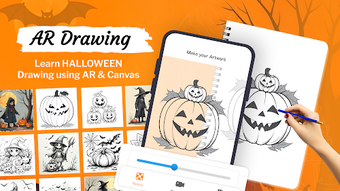
AR Drawing: Halloween Sketch is a creative augmented reality application designed to make digital drawing accessible and enjoyable for users of all skill levels. The app leverages AR technology to transform the traditional drawing process into an interactive and immersive experience. It is particularly tailored for art enthusiasts, students, and casual creators who want to explore their artistic potential in a fun, low-pressure environment. The app enables users to draw directly onto a real-world surface using the device’s camera, with the ability to trace over preloaded images or create original sketches from scratch. With over 150 themed artworks—spanning Halloween, Diwali, and Christmas—users can explore seasonal creativity and experiment with different styles. The app’s focus on intuitive design and real-time visual feedback supports both beginners learning basic techniques and experienced users refining their skills. It is ideal for educational settings, creative workshops, or personal artistic exploration. The developer did not provide additional information about the company’s background or prior projects. Real-world usage scenarios include classroom art activities, family creative sessions, and personal sketching practice. The application is available at no cost, making it accessible to a broad audience seeking a lightweight and engaging creative tool.
Key Features & Capabilities
- Augmented Reality Drawing – Users can draw directly on physical surfaces using the device’s camera, blending digital art with real-world environments for a dynamic creative experience.
- Tracing Tool with Transparent Overlay – The app provides a semi-transparent layer over selected images, allowing users to trace outlines and develop their hand-eye coordination and drawing precision.
- 150+ Themed Artworks – A diverse library of images, including Halloween, Diwali, and Christmas designs, offers inspiration and variety for seasonal and cultural creativity.
- Image-to-Sketch Conversion – Users can upload or select photos and convert them into sketch-style drawings, serving as a starting point for further artistic enhancement.
- In-App Video Recording – The ability to record the entire drawing process allows users to preserve their work, share progress with others, or review techniques for improvement.
- Dual Drawing Modes – Supports both AR camera tracing and traditional canvas-based drawing, offering flexibility in how users approach their artwork.
These features enable a range of practical applications. For example, a student can trace a Halloween pumpkin design to practice shading and line control, while a parent can use the app to engage children in seasonal art projects. Artists may use the sketch conversion tool to generate initial drafts before refining them manually. The integration of AR technology enhances spatial awareness and depth perception, making the drawing process more intuitive. The app’s structure supports both guided learning and open-ended creativity, catering to different user preferences. The developer did not specify additional features beyond those listed.
User Interface, Workflow & Performance
The user interface of AR Drawing: Halloween Sketch is designed with simplicity and accessibility in mind. The main screen presents a clean layout with easy-to-navigate icons for selecting drawing modes, accessing the artwork library, and initiating video recording. Navigation is intuitive, relying on touch gestures and clearly labeled buttons, which reduces the learning curve for new users. The workflow begins with choosing a theme or image, followed by selecting a drawing mode—either AR tracing or canvas sketching—then beginning the drawing process. The app responds to touch inputs with minimal lag, suggesting a responsive interface. However, exact performance details were not specified by the developer. The app’s performance is expected to align with general mobile application behavior, with smooth operation under typical usage conditions. Stability during extended drawing sessions was not tested or documented. The developer did not provide information on CPU or RAM usage. Users should expect standard resource consumption for a mobile AR application. The app’s design emphasizes ease of use, making it suitable for younger users and those unfamiliar with digital art tools. The overall experience is streamlined, focusing on creativity rather than technical complexity.
Compatibility & System Requirements
AR Drawing: Halloween Sketch is available for both iOS and Android platforms, ensuring broad accessibility across mobile devices. The app has been released in version 2.1.0 and has a file size of 125 MB, which is relatively lightweight for a feature-rich application. The developer did not specify exact system requirements such as minimum processor speed, RAM, or storage space needed for optimal performance. Compatibility information is limited to the operating systems listed. Users are advised to ensure their device meets general standards for running AR applications, such as having a functional camera and sufficient processing power. The app’s reliance on augmented reality suggests it may require a device with a front or rear-facing camera and motion sensors. However, specific hardware requirements were not provided. Installation is straightforward, and the app is designed to function without requiring additional software or plugins. Users should verify that their device supports AR functionality before downloading. The developer did not clarify whether the app supports tablet devices or different screen sizes.
Pros and Cons
Pros
- Free to download and use, making it accessible to a wide audience.
- Intuitive interface suitable for beginners and children.
- Combines AR technology with traditional sketching for a unique creative experience.
- Offers over 150 themed artworks for diverse artistic inspiration.
- Includes video recording to capture and share the drawing process.
- Supports both AR tracing and canvas drawing modes for flexibility.
Cons
- Exact system requirements were not listed, which may affect user expectations.
- Limited information on performance under heavy usage or long sessions.
- App size may be larger than expected for some low-storage devices.
- Developer background and company details are not publicly available.
- Offline functionality was not confirmed; users may require internet access for some features.
FAQ Section
Is AR Drawing: Halloween Sketch available for free?
Yes, the app is available at no cost on both iOS and Android platforms.
What devices support AR Drawing: Halloween Sketch?
The app is compatible with iOS and Android devices. Specific device models or hardware requirements were not provided by the developer.
Can I use the app without an internet connection?
It is unclear whether the app supports full offline functionality. Some features may require internet access, but this was not specified.
Does the app include a license or subscription model?
The app is currently offered as a free tool without indication of a subscription or in-app purchase requirements.
How often is AR Drawing: Halloween Sketch updated?
The app was last updated on October 15, 2024, with version 2.1.0. Future update frequency was not disclosed.
Final Thoughts
AR Drawing: Halloween Sketch stands out as a thoughtful and accessible tool for digital creativity, particularly for users interested in augmented reality and seasonal art. Its blend of AR tracing, image conversion, and video recording makes it a versatile option for learners, educators, and hobbyists. The app’s focus on user-friendly design and broad thematic content ensures a welcoming experience for all ages. While some technical details remain unspecified, the core functionality is clear and well-executed. It excels in providing a low-barrier entry into digital art, especially for beginners and younger users. For those seeking a fun, interactive way to explore drawing, this app delivers on its promise. The combination of free access, rich content, and innovative AR integration makes it a compelling choice in the creative software space. Download AR Drawing: Halloween Sketch now.
Guides & Tutorials for AR Drawing Halloween Sketch
How to install AR Drawing Halloween Sketch
- Click the Preview / Download button above.
- Once redirected, accept the terms and click Install.
- Wait for the AR Drawing Halloween Sketch download to finish on your device.
How to use AR Drawing Halloween Sketch
This software is primarily used for its core features described above. Open the app after installation to explore its capabilities.
User Reviews for AR Drawing Halloween Sketch 0
No reviews found





